We have a Discord now. You can view the Q&A from Google.


Hey all! We’ve got a Discord so you can chat with us about the wild world of object storage and get any help you need. We’ve also set up Answer Overflow so that you can browse the Q&A from the web:
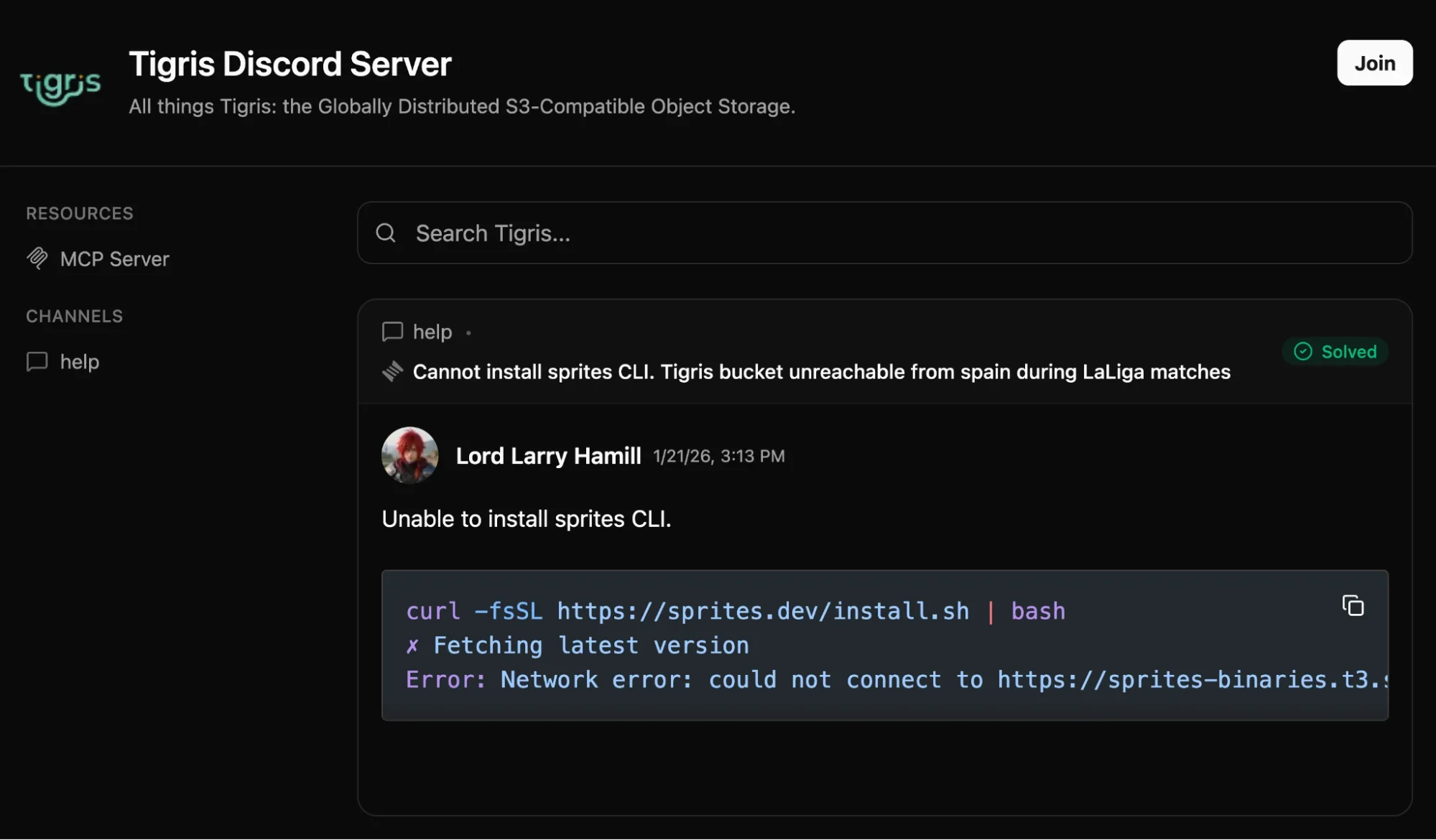
Today I’m going to discuss how we got there and solved one of the biggest problems with setting up a new community or forum: backfilling existing Q&A data so that the forum doesn’t look sad and empty.
All the code I wrote to do this is open source in our glue repo. The rest of this post is a dramatic retelling of the thought process and tradeoffs that were made as a part of implementing, testing, and deploying this pull request.
Ready? Let’s begin!
Thinking about this from an AI Big Data™ perspective
There’s a bunch of ways you can think about this problem, but given the current hype zeitgeist and contractual obligations we can frame this as a dataset management problem. Effectively we have a bunch of forum question/answer threads on another site, and we want to migrate the data over to a new home on Discord. This is the standard “square peg to round hole” problem you get with Extract, Transform, Load (ETL) pipelines and AI dataset management (mostly taking your raw data and tokenizing it so that AI models work properly).
So let’s think about this from an AI dataset perspective. Our pipeline has three distinct steps:
- Extracting the raw data from the upstream source and caching it in Tigris.
- Transforming the cached data to make it easier to consume in Discord, storing that in Tigris again.
- Loading the transformed data into Discord so that people can see the threads in app and on the web with Answer Overflow.
When thinking about gathering and transforming datasets, it’s helpful to start by thinking about the modality of the data you’re working with. Our dataset is mostly forum posts, which is structured text. One part of the structure contains HTML rendered by the forum engine. This, the “does this solve my question” flag, and the user ID of the person that posted the reply are the things we care the most about.
I made a bucket for this (in typical recovering former SRE fashion it’s named for a completely different project) with snapshots enabled, and then got cracking. Tigris snapshots will let me recover prior state in case I don’t like my transformations.
Gathering the dataset
When you are gathering data from one source in particular, one of the first things you need to do is ask permission from the administrator of that service. You don’t know if your scraping could cause unexpected load leading to an outage. It’s a classic tragedy of the commons problem that I have a lot of personal experience in preventing. When you reach out, let the administrators know the data you want to scrape and the expected load– a lot of the time, they can give you a data dump, and you don’t even need to write your scraper. We got approval for this project, so we’re good to go!
To get a head start, I adapted an old package of mine to assemble User-Agent strings in such a way that gives administrators information about who is requesting data from their servers along with contact information in case something goes awry. Here’s an example User-Agent string:
tigris-gtm-glue (go1.25.5/darwin/arm64; https://tigrisdata.com; +qna-importer) Hostname/hoshimi-miyabi.local
This gives administrators the following information:
- The name of the project associated with the requests (tigris-gtm-glue, where gtm means “go-to-market”, which is the current in-vogue buzzword translation for whatever it is we do).
- The Go version, computer OS, and CPU architecture of the machine the program is running on so that administrator complaints can be easier isolated to individual machines.
- A contact URL for the workload, in our case it’s just the Tigris home page.
- The name of the program doing the scraping so that we can isolate root causes
down even further. Specifically it’s the last path element of
os.Args[0], which contains the path the kernel was passed to the executable. - The hostname where the workload is being run in so that we can isolate down to an exact machine or Kubernetes pod. In my case it’s the hostname of my work laptop.
This seems like a lot of information, but realistically it’s not much more than the average Firefox install attaches to each request:
User-Agent: Mozilla/5.0 (Macintosh; Intel Mac OS X 10.15; rv:146.0) Gecko/20100101 Firefox/146.0
The main difference is adding the workload hostname purely to help debugging a misbehaving workload. This is a concession that makes each workload less anonymous, however keep in mind that when you are actively scraping data you are being seen as a foreign influence. Conceding more data than you need to is just being nice at that point.
If you’re given the whole webapp, you use the whole webapp
One of the other “good internet citizen” things to do when doing benign scraping is try to reduce the amount of load you cause to the target server. In my case the forum engine is a Rails app (Discourse), which means there’s a few properties of Rails that work to my advantage.
Fun fact about Rails: if you append .json to the end of a URL, you typically
get a JSON response based on the inputs to the view. For example, consider
my profile on Lobsters at
https://lobste.rs/~cadey. If you instead head to
https://lobste.rs/~cadey.json, you get a JSON
view of my profile information. This means that a lot of the process involved
gathering a list of URLs with the thread indices we wanted, then constructing
the thread URLs with .json slapped on the end to get machine-friendly JSON
back.
This made my life so much easier.
Shoving it in Tigris
Now that we have easy ways to get the data from the forum engine, the next step is to copy it out to Tigris directly after ingesting it. In order to do that I reused some code I made ages ago as a generic data storage layer kinda like Keyv in the node ecosystem. One of the storage backends was a generic object storage backend. I plugged Tigris into it and it worked on the first try. Good enough for me!
Either way: this is the interface I used:
// Interface defines the calls used for storage in a local or remote datastore.
// This can be implemented with an in-memory, on-disk, or in-database storage
// backend.
type Interface interface {
    // Delete removes a value from the store by key.
    Delete(ctx context.Context, key string) error

    // Exists returns nil if the key exists, ErrNotFound if it does not exist.
    Exists(ctx context.Context, key string) error

    // Get returns the value of a key assuming that value exists and has not expired.
    Get(ctx context.Context, key string) ([]byte, error)

    // Set puts a value into the store that expires according to its expiry.
    Set(ctx context.Context, key string, value []byte) error

    // List lists the keys in this keyspace optionally matching by a prefix.
    List(ctx context.Context, prefix string) ([]string, error)
}
By itself this isn’t the most useful, however the real magic comes with my
JSON[T] adaptor type.
This uses Go generics to do type-safe operations on Tigris such that you have
90% of what you need for a database replacement. When you do any operations on a
JSON[T] adaptor, the following happens:
- Key names get prefixed automatically.
- All data is encoded into JSON on write and decoded from JSON on read using the Go standard library.
- Type safety at the compiler level means the only way you can corrupt data is by having different “tables” share the same key prefix. Try not to do that! You can use Tigris bucket snapshots to help mitigate this risk in the worst case.
In the future I hope to extend this to include native facilities for forking, snapshots, and other nice to haves like an in-memory cache to avoid IOPs pressure, but for now this is fine.
As the data was being read from the forum engine, it was saved into Tigris. All future lookups to that data I scraped happened from Tigris, meaning that the upstream server only had to serve the data I needed once instead of having to constantly re-load and re-reference it like the latest batch of abusive scrapers seem to do.
Massaging the data
So now I have all the data, I need to do some massaging to comply both with Discord’s standards and with some arbitrary limitations we set on ourselves:
- Discord needs Markdown, the forum engine posts are all HTML.
- We want to remove personally-identifiable information from those posts just to keep things a bit more anonymous.
- Discord has a limit of 2048 characters per message and some posts will need to be summarized to fit within that window.
In general, this means I needed to take the raw data from the forum engine and streamline it down to this Go type:
type DiscourseQuestion struct {
    Title string          `json:"title"`
    Slug  string          `json:"slug"`
    Posts []DiscoursePost `json:"posts"`
}

type DiscoursePost struct {
    Body     string `json:"body"`
    UserID   string `json:"userID"`
    Accepted bool   `json:"accepted"`
}
In order to make this happen, I ended up using a simple AI agent to do the cleanup. It was prompted to do the following:
- Convert HTML to Markdown: Okay, I could have gotten away using a dedicated library for this like html2text, but I didn’t think about that at the time.
- Remove mentions and names: Just strip them out or replace the mentions with generic placeholders (“someone I know”, “a friend”, “a colleague”, etc.).
- Keep “useful” links: This was left intentionally vague and random sampling showed that it was good enough.
- Summarize long text: If the text is over 1000 characters, summarize it to less than 1000 characters.
I figured this should be good enough so I sent it to my local DGX Spark running GPT-OSS 120b via llama.cpp and manually looked at the output for a few randomly selected threads. The sample was legit, which is good enough for me.
Once that was done I figured it would be better to switch from the locally hosted model to a model in a roughly equivalent weight class (gpt-5-mini). I assumed that the cloud model would be faster and slightly better in terms of its output. This test failed because I have somehow managed to write code that works great with llama.cpp on the Spark but results in errors using OpenAI’s production models.
I didn’t totally understand what went wrong, but I didn’t dig too deep because I knew that the local model would probably work well enough. It ended up taking about 10 minutes to chew through all the data, which was way better than I expected and continues to reaffirm my theory that GPT-OSS 120b is a good enough generic workhorse model, even if it’s not the best at coding.
Avoiding everything being a generic pile of meh
From here things worked, I was able to ingest things and made a test Discord to try things out without potentially getting things indexed. I had my tool test-migrate a thread to the test Discord and got this:
To be fair, this worked way better than expected (I added random name generation and as a result our CEO Ovais, became Mr. Quinn Price for that test), but it felt like one thing was missing: avatars. Having everyone in the migrated posts use the generic “no avatar set” avatar certainly would work, but I feel like it would look lazy. Then I remembered that I also have an image generation model running on the Spark: Z-Image Turbo. Just to try it out, I adapted a hacky bit of code I originally wrote on stream while I was learning to use voice coding tools to generate per-user avatars based on the internal user ID and got results like this:

This worked way better than I expected when I tested how it would look with each avatar attached to their own users:
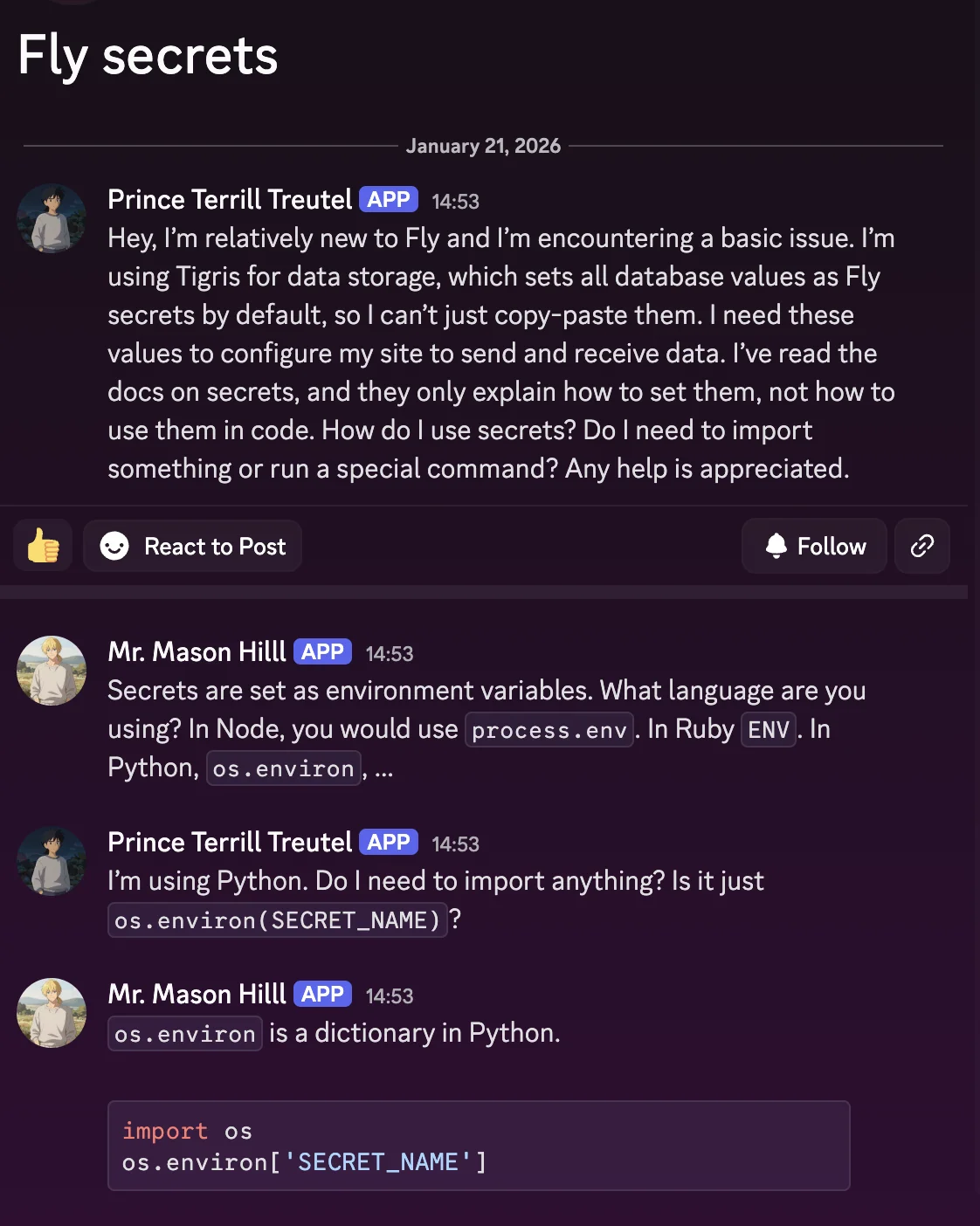
In order to serve the images, I stored them in the same Tigris bucket, but set ACLs on each object so that they were public, meaning that the private data stayed private, but anyone can view the objects that were explicitly marked public when they were added to Tigris. This let me mix and match the data so that I only had one bucket to worry about. This reduced a lot of cognitive load and I highly suggest that you repeat this pattern should you need this exact adaptor between this exact square peg and round hole combination.
Making the forum threads look like threads
Now that everything was working in development, it was time to see how things would break in production! In order to give the façade that every post was made by a separate user, I used a trick that my friend who wrote Pluralkit (an accessibility tool for a certain kind of neurodivergence) uses: using Discord webhooks to introduce multiple pseudo-users into one channel.
I had never combined forum channels with webhook pseudo-users like this before,
but it turned out to be
way easier than expected.
All I had to do was add the right thread_name parameter when creating a new
thread and the thread_id parameter when appending a new message to it. It was
really neat and made it pretty easy to associate each thread ingressed from
Discourse into its own Discord thread.
The big import
Then all that was left was to run the Big Scary Command™ and see what broke. A couple messages were too long (which was easy to fix by simply manually rewriting them, doing the right state layer brain surgery, deleting things on Discord, and re-running the migration tool. However 99.9% of messages were correctly imported on the first try.
I had to double check a few times including the bog-standard wakefulness tests. If you’ve never gone deep into lucid dreaming before, a wakefulness test is where you do something obviously impossible to confirm that it does not happen, such as trying to put your fingers through your palm. My fingers did not go through my palm. After having someone else confirm that I wasn’t hallucinating more than usual I found out that my code did in fact work and as a result you can now search through the archives on community.tigrisdata.com or via the MCP server!
I consider that a massive success.
Conclusion: making useful forums
As someone who has seen many truly helpful answers get forgotten in the endless scroll of chats, I wanted to build a way to get that help in front of users when they need it by making it searchable outside of Discord. Finding AnswerOverflow was pure luck: I happened to know someone who uses it for the support Discord for the Linux distribution I use on my ROG Ally, Bazzite. Thanks, j0rge!
AnswerOverflow also has an MCP server so that your agents can hook into our knowledge base to get the best answers. To find out more about setting it up, take a look at the “MCP Server” button on the Tigris Community page. They’ve got instructions for most MCP clients on the market. Worst case, configure your client to access this URL:
https://community.tigrisdata.com/mcp
And bam, your agent has access to the wisdom of the ancients.
But none of this is helpful without the actual answers. We were lucky enough to have existing Q&A in another forum to leverage. If you don’t have the luxury, you can write your own FAQs and scenarios as a start. All I can say is, thank you to the folks who asked and answered these questions– we’re happy to help, and know that you’re helping other users by sharing.
Connect with other developers, get help, and share your projects. Search our Q&A archives or ask a new question.