Event-Driven Multimodal Ingestion with Tigris and Mixpeek


Most AI search tools handle text well until you throw a video, an audio recording, or a scanned PDF at them. You have a bucket full of that kind of content. How do you make it searchable without building and maintaining your own polling pipeline?
That's the problem Mixpeek solves. It's a multimodal intelligence layer that sits on top of your object storage, turning raw unstructured media into searchable, classifiable, and retrievable features without you having to build the pipeline yourself. When you connect it to Tigris, the whole thing becomes event-driven from the moment an object lands in your bucket.
Why Mixpeek chose Tigris as the storage layer
Tigris is a globally distributed, multi-cloud object storage service with built-in support for the S3 API. Because it speaks the S3 API natively, connecting Mixpeek is straightforward. It uses standard IAM-style credentials, the same SDKs you're already using, just a different endpoint. You can read more in the Tigris overview.
S3 compatibility is just the baseline. When Mixpeek processes your files, it doesn't just read each object once. It makes repeated requests during extraction: reading video in segments, pulling document pages, fetching image data at different resolutions. With S3, each of those reads adds up in both latency and cost.
Because Mixpeek uses Tigris as the storage layer, your files are read from the region closest to the processing node running the extraction job. Latency stays low regardless of where your users are uploading from. And with no egress fees, Mixpeek can read your objects as many times as the pipeline needs without the cost model working against you.
Here is how Tigris maps directly onto Mixpeek’s requirements:
| What Tigris provides | Why it matters for Mixpeek users |
|---|---|
| Global distribution | Extraction jobs read files from the nearest region, keeping latency low |
| Zero egress fees | Repeated reads during processing don't accumulate transfer costs |
| S3 compatibility | No migration needed. Connect with existing AWS SDKs and credentials |
| Strong consistency | Every read reflects the latest write, so processing never works on stale data |
How Mixpeek connects to your Tigris bucket
Connecting Mixpeek to Tigris follows the same S3-compatible authentication pattern. You grant Mixpeek read access to your bucket using standard IAM-style credentials, and Mixpeek uses those to discover and retrieve objects for processing.
The GIF below shows the end-to-end flow in the Mixpeek dashboard:
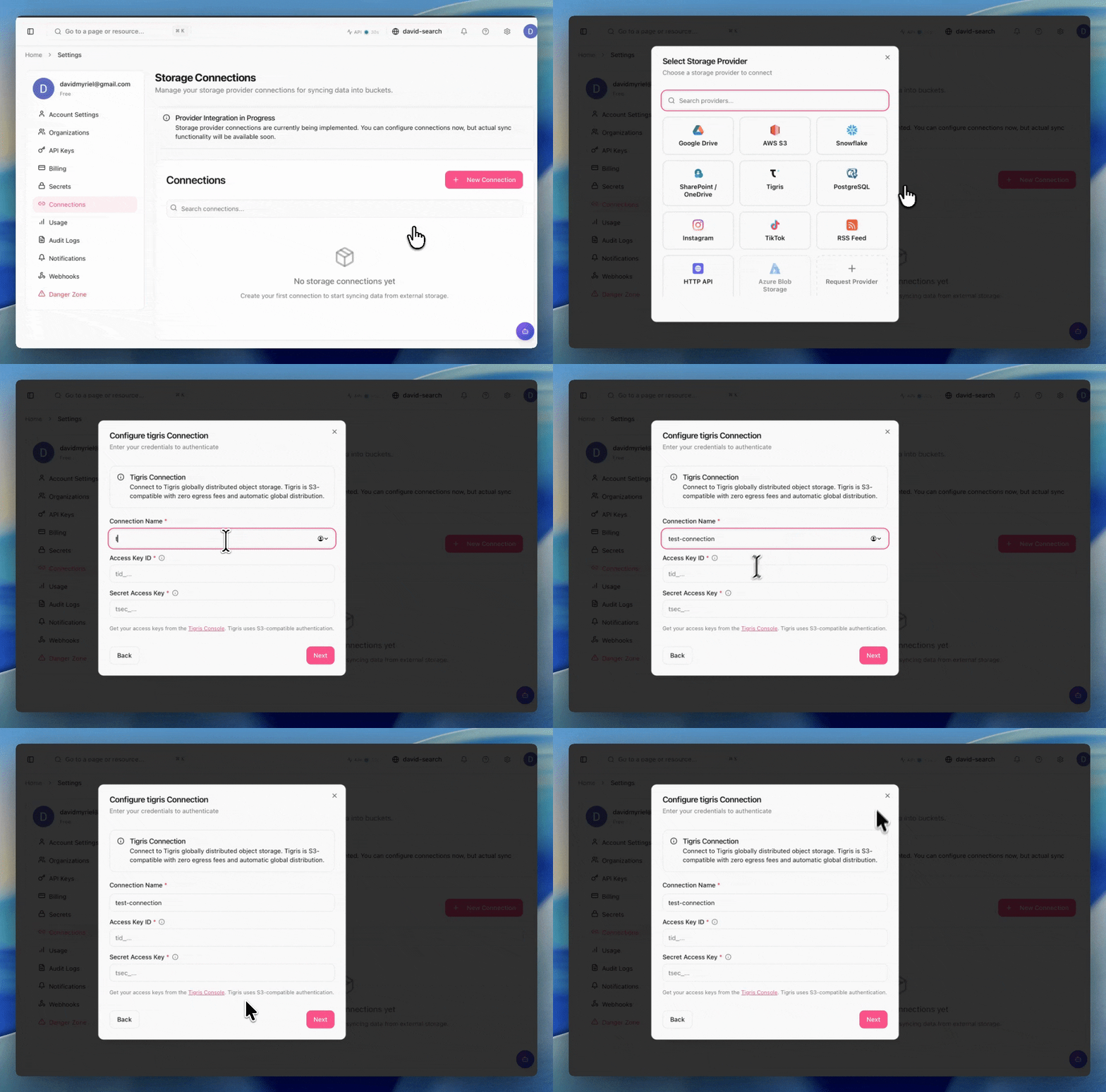
Once connected, Mixpeek runs an initial sync to backfill existing objects in the bucket. From that point on, it processes new objects incrementally rather than re-scanning the entire bucket on each run. You can also scope ingestion to a specific prefix if you only want Mixpeek watching part of your bucket. For details on working with buckets, see the Tigris bucket docs.
At a high level, the control plane looks like this:
How Mixpeek turns files into searchable layers
When a file hits a Mixpeek-connected bucket, it gets broken into layers: transcripts, visual embeddings, scene descriptions, and detected entities. Each of those layers is independently queryable.
For video, that means frame-accurate retrieval. Search for "person writing on whiteboard" and you get back the exact timestamp, not just the file name. The pipeline handles video, images, audio, and PDFs through the same unified API.
Here's what that looks like in practice. Say a property management company uploads walkthrough videos of new listings every day. With Mixpeek and Tigris, each walkthrough is automatically broken into room-level segments the moment it lands in the bucket. An agent can search "kitchen with granite countertops" and get back the exact timestamp in the exact video — across thousands of hours of footage. No polling delay, no manual tagging.
The same pattern works for media companies indexing footage libraries, edtech platforms making lecture recordings searchable, or compliance teams flagging documents on arrival.
Conceptually, the data path is:
And here's what the query looks like once your media is indexed:
results = mixpeek.search(
    query="person writing on whiteboard",
    modalities=["video", "image"],
    filters={"bucket": "my-media-bucket"}
)

# => [{"file_key": "videos/interview-2025.mp4", "timestamp": "00:02:14", "score": 0.94}, ...]
Why polling-based ingestion does not scale
Building this kind of ingestion pipeline yourself means solving a lot of boring, hard problems before you get to the interesting ones. How do you know when a new file arrives? How do you avoid processing the same file twice? What happens when a job fails mid-extraction?
Without event notifications, most integrations fall back to periodic list-and-diff polling. You scan the bucket on a schedule, compare against what you've already processed, and queue up the new objects.
This works for small, low-volume buckets. Once you have millions of objects and steady traffic, the tradeoffs get sharp:
| Problem | What happens in a polling pipeline |
|---|---|
| Indexing lag | A 5-minute poll interval means the index is always 0–5 minutes behind writes. Tighter schedules increase list calls and hit rate limits. |
| Wasted reads | Most polls re-scan keys that have not changed, burning API calls, bandwidth, and CPU just to learn that nothing happened. |
| Failure recovery | If a polling run crashes halfway through, you need durable checkpoints to avoid either missing objects or reprocessing large parts of the bucket. |
| Thundering herds | During an upload spike, every poll returns huge diffs at once. Downstream workers see sawtooth loads instead of a smooth stream of events. |
At scale, a missed cycle can leave your index stale for minutes or longer. A noisy neighbor workload or a transient 500 from your cloud provider is all it takes.
How Tigris Object Notifications replace polling
Tigris Object Notifications flip the model from pull to push. When an object is created, updated, or deleted, Tigris fires an HTTP POST to your configured webhook endpoint immediately.
You set this up once in the Tigris Dashboard under bucket settings. No polling loop. No scheduled scans. Mixpeek's ingestion endpoint receives the event and kicks off processing as soon as the object exists.
Here is a simplified example of the payload Mixpeek receives:
{
  "eventType": "OBJECT_CREATED_PUT",
  "bucket": "my-media-bucket",
  "key": "videos/interview-2025.mp4",
  "size": 104857600,
  "lastModified": "2025-03-02T10:45:00Z",
  "etag": "abc123def456"
}
You can also filter which events hit your webhook using Tigris's SQL-like metadata querying, so you only trigger processing for the object types your pipeline actually needs.
How Mixpeek handles bursty uploads safely
Event-driven pipelines need failure handling built in. Mixpeek covers the operational pieces that most teams have to build themselves.
The table below summarizes the key reliability features in the ingestion layer:
| Reliability feature | What it does |
|---|---|
| Dead Letter Queue | Retries failed objects up to 3 times, then quarantines them instead of blocking the pipeline |
| Idempotent ingestion | Deduplicates by bucket + source + object identity, so retries never double-process |
| Distributed locking | Prevents concurrent sync runs from colliding during bursty event storms |
| Rate-limit backoff | Automatic 429 handling to smooth spikes without dropping events |
| Metrics | Duration, batch counts, failure rates, and DLQ depth all exposed for ops visibility |
A burst of uploads shouldn't cause your pipeline to process the same file four times or deadlock on concurrent runs. These safeguards make sure it doesn't.
Access patterns once your media is indexed
Search is one access pattern, but it's not the only one. A few of the common access patterns look like this:
| Access pattern | What it means |
|---|---|
| Retrieval | Semantic search across video frames, audio segments, PDF pages |
| Classification | Auto-tag objects by content, entity, or visual category |
| Clustering | Group similar assets, surface duplicates, find dataset gaps |
| Anomaly detection | Flag out-of-distribution objects as they arrive |
All of this runs against the same indexed representation Mixpeek builds from your Tigris bucket. You don't maintain separate pipelines for each access pattern.
Using your Tigris bucket as the system of record
Treat your Tigris bucket as the authoritative record of your dataset, not just a place to dump files. Mixpeek writes structured outputs (JSON metadata, derived segments, embeddings) that map back to a stable object identity in Tigris: bucket + key + ETag. If you need to reproduce a result, the lineage is there.
{
  "source": {
    "bucket": "my-media-bucket",
    "key": "videos/interview-2025.mp4",
    "etag": "abc123def456"
  },
  "segments": [
    {
      "timestamp": "00:02:14",
      "text": "person writing on whiteboard",
      "score": 0.94
    },
    {
      "timestamp": "00:05:41",
      "text": "diagram of system architecture",
      "score": 0.87
    }
  ]
}
Pair this with Tigris snapshots and you get point-in-time reproducibility without managing a separate versioning system. If an experiment goes sideways, fork from a known-good snapshot and replay processing against that state. To start using snapshots in your own buckets, follow the snapshot how-to guide.
End-to-end flow from upload to query
Each step is independently observable. You can monitor DLQ depth and batch metrics, and replay any event that was missed during an outage using Mixpeek's reconciliation scan.
Try it yourself
Connect your Tigris bucket to Mixpeek using the Mixpeek integrations guide. Configure Object Notifications in your Tigris Dashboard, point the webhook at Mixpeek's ingestion endpoint, and your pipeline is live. Mixpeek's free tier lets you index your first objects at no cost — enough to test the full pipeline end to end before committing to production volume.
Here's the quick version:
import boto3

# 1. Upload to your Tigris bucket
s3 = boto3.client(
    "s3",
    endpoint_url="https://fly.storage.tigris.dev",
    aws_access_key_id="YOUR_TIGRIS_KEY",
    aws_secret_access_key="YOUR_TIGRIS_SECRET",
    region_name="auto",
)
s3.upload_file("demo-video.mp4", "my-media-bucket", "videos/demo.mp4")

# 2. Tigris fires the notification to Mixpeek automatically

# 3. Query the result
import mixpeek
results = mixpeek.search(query="diagram of system architecture")
print(results[0]["timestamp"], results[0]["score"])
# "00:05:41" 0.87
No polling. No stale indexes. Just push-based processing from the moment your media hits storage.
Conclusion: event-driven ingestion without polling
Mixpeek and Tigris work best when you treat object notifications as the nervous system of your multimodal stack. Tigris handles globally distributed, low-latency object storage and push-based delivery of every change event. Mixpeek turns those events into transcripts, embeddings, and manifests you can query in one place.
If you're still polling buckets on a schedule, this is your path off the cron wheel: wire up notifications once, point them at Mixpeek, and let the pipeline keep your index fresh while you focus on what to build with it.
Mixpeek's free tier lets you start indexing your media in minutes. Connect your Tigris bucket and try Mixpeek today:
Mixpeek Tigris integration guide
Need to store terabytes of multimodal data everywhere? Tigris has you covered without any pesky egress fees. Try it today and get the first 5 gigabytes on us.