Introducing Multi-Region and Dual-Region Buckets


Today, we're introducing bucket location types in Tigris. Going forward, there will be four ways to control exactly where your data lives and how resilient it is.
Tigris has always distributed data globally. You write once, then read fast from anywhere. That model works well for most workloads, but it left no room for teams with constraints the automatic model could not accommodate.
-
The first constraint is compliance. GDPR, data sovereignty laws, and enterprise contracts can require that data never leaves a specific country or region. "Close to your users" doesn't satisfy a regulation that says Frankfurt or nothing.
-
The second is architecture. Multi-tenant platforms, active/active deployments, and compute-co-located pipelines all need storage in a known location. When your system depends on a topology guarantee, automatic distribution works against you.
Multi-region and dual-region buckets are our answer to that gap. Multi-region is the recommended default for most production workloads; dual-region lets you name two specific regions when regulations or architecture call for it. You can choose exactly where your data lives and how resilient it needs to be across four location types:
Global buckets

Global buckets are what Tigris has always done: data distributed worldwide, reads served from the region closest to the request. They're now a first-class location type you can select intentionally.
They're the right choice for read-heavy workloads with users spread across the world: model weights, media libraries, static assets, documentation. You write infrequently, you read everywhere, and Tigris handles the rest.
Tigris is deployed globally across multiple regions. All regions are accessible
via https://t3.storage.dev and https://fly.storage.tigris.dev, which handle
routing automatically. In your SDKs or the AWS CLI, set the region to auto and
Tigris takes care of the rest.
Multi-region buckets (recommended default)
This is the place to start for most new production workloads. Multi-region
buckets keep copies of your data across a group of regions within a chosen
geography (for example usa or eur). You select the geography (USA or EUR),
Tigris automatically selects the regions inside that geography, and maintains
two or more copies. Every read and write inside that geography behaves
consistently. If one region has a bad day, the others keep serving traffic.
Front-end assets, feature flags, and user data that needs both low latency and resilience to regional failures all fit this model. You get strong, predictable behavior without hand-wiring replication between single-region buckets.
Multi-region buckets are priced at $0.025/GB/month, regardless of how many regions Tigris uses inside the geography, and egress is still free. That's often less than dual-region, where storage scales with each region you add. See the pricing page for details.
A multi-region bucket in the EUR geography might look like this:
Here is how to create multi-region buckets with the CLI:
# Create a multi-region bucket scoped to the EUR geography
tigris mk my-eu-bucket --locations eur

# Create a multi-region bucket scoped to the USA geography
tigris mk my-us-bucket --locations usa
tigris mk is an alias for tigris create, so any existing commands that use
create will keep working.
Dual-region buckets
Dual-region stores copies in two or more regions you name. The “dual” label matches GCS terminology, but the feature itself does not limit you to exactly two regions—we simply recommend choosing two for most workloads. Reads route to whichever copy is closest. Writes go to all selected regions.
Most teams should start with multi-region buckets; dual-region is for the
cases where you must pin data to specific regions instead of a geography like
eur or usa. This fits when your compute layer is split across two named
regions and storage needs to match, or when you want a small, explicitly pinned
set of regions. It also works as a warm DR setup: a second copy in a known
location without running your own replication service. Pricing stays simple here
too: storage and Class A operations are billed per underlying region at the
standard single-region rate, so if you pick three regions you pay 3 × $0.02 =
$0.06/GB/month in total, with zero egress fees.
For example, a dual-region bucket might be:
Example CLI commands for common dual-region setups:
# US dual-region: East + West
tigris mk my-bucket --locations iad,sjc
Single-region buckets
Single-region buckets keep data in one region. They're the most cost-effective option and the right fit for staging environments, regional internal tools, and batch pipelines that live alongside a single compute region. You still get strong consistency within that region. You just don't pay for replication you don't need.
In the simplest case, everything lives in one place:
You can create single-region buckets with a simple CLI flag:
# Create a single-region bucket in Singapore
tigris mk my-bucket --locations sin

# Create a single-region bucket in Ashburn, Virginia
tigris mk my-bucket --locations iad
Configuring bucket locations
You can configure bucket location in the Tigris Dashboard, under Advanced Settings. When creating a bucket, the Location field lets you choose between Global, Multi-region, Dual-region, and Single-region.
- For Multi-region, pick a geo group like
USAorEURfrom the dropdown. - For Dual-region, select two specific region IDs.
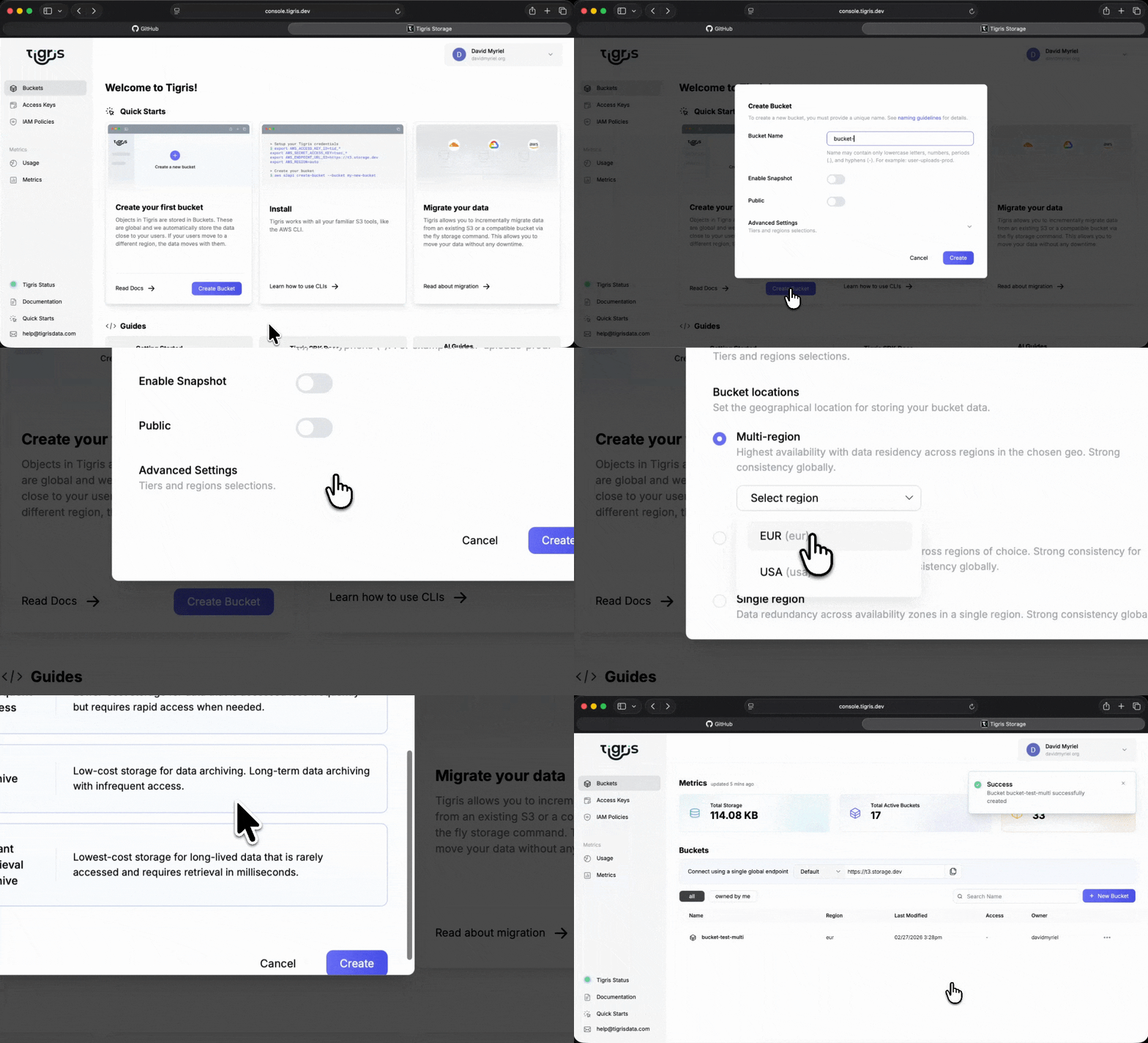
For existing buckets, go to the Tigris Dashboard, open the bucket, click Settings, and update the bucket location from there.
Pricing
Tigris keeps pricing intentionally simple: one storage line item per bucket, the same rates across geographies, and zero egress fees.
| Bucket type | Storage price | Egress fees | Geo pricing | Replication charges |
|---|---|---|---|---|
| Multi-region | $0.025/GB/month | Free | Same price in USA and EUR geos | Included (no per-replica fees) |
| Dual-region | $0.02/GB/month per region | Free | Same per-GB rates across geos | Included (no per-region add-ons) |
| Single-region | $0.02/GB/month | Free | Same per-GB rates across geos | Included (no per-region add-ons) |
| Global | $0.02/GB/month | Free | Global | Included |
For dual-region buckets, total storage and Class A costs scale linearly with the number of regions you select. That’s why we recommend multi-region as the default: at $0.025/GB/month flat, it becomes cheaper than dual-region once you need two or more regions in a geography.
Don't forget, your first 5GB are free! For the full breakdown, including storage tiers and request pricing, see the Tigris pricing page.
Compliance and data residency

Many teams pick bucket locations to satisfy legal or policy requirements, not just latency.
| Requirement or rule | How bucket locations help |
|---|---|
| European Union rules | GDPR Article 44 restricts personal data transfers outside the EU. A global bucket that might cache user records in Singapore or Virginia creates legal exposure. A multi-region bucket with eur location keeps that data inside the EU. |
| Other regions and sectors | Brazil's LGPD covers data residency for Brazilian users (gru), and sector-specific regulations like HIPAA for US healthcare or financial data rules in some jurisdictions often require data to stay within defined borders. |
When you need to go beyond geography-level controls like
eurand pin data to specific regions, Dual-region lets you say “only these regions” at the storage layer without building your own replication logic.
Consistency options
Consistency in Tigris is about how quickly every reader sees the latest write, and your bucket’s location type decides that behavior.
- Same‑region reads are always strongly consistent: as soon as you write, overwrite, delete, or list an object in that region, you see the latest state.
- Cross‑region reads either stay strongly consistent (Multi‑region and Single‑region) or may briefly return an older copy while replicas catch up (Global and Dual‑region).
If you want every read, from anywhere, to see the latest data, pick Multi‑region or Single‑region; if you can tolerate occasional sub‑second staleness in exchange for lower latency or automatic global placement, Global is often a better fit, and Dual‑region makes sense when you also need reads pinned to specific regions.
For the exact guarantees for each location type, see the consistency docs.
Choosing a location type
Use this table as a quick decision guide:
| Scenario | Location type |
|---|---|
| Global app, read-heavy, users everywhere | Global |
| User-facing app that must survive a regional outage | Multi-region (usa or eur) |
| GDPR / EU data residency | Multi-region (eur) |
| Active/active across two data centers | Dual-region |
| Staging, internal tools, single-region compute | Single-region |
If you're unsure, multi-region in your primary geography is the safe default for production. You get resilience inside that geography without touching your application code.
Your existing buckets keep working exactly as before. For new workloads, read the bucket locations guide and the regions docs and pick the type that matches your geography, latency, and resilience requirements.
Sign in to the Tigris console, pick your geography, and let Tigris handle replication and failover—your first 5 GB are free.