Snapshots
A snapshot captures the state of an entire bucket at a specific point in time. Unlike per-object versioning which tracks individual objects, snapshots provide a consistent view of all objects in a bucket together.
- Snapshots are immutable: once created, they never change.
- Writes go to the live bucket; snapshots remain frozen.
- Deletions in the live bucket don't affect prior snapshots.
- Snapshots can seed a fork, an instant, isolated copy of a bucket.
How snapshots work
Traditional snapshots require deep copies of entire buckets, expensive O(n) operations that don't scale. Tigris is built on an append-only architecture where immutability is a core design principle. Instead of copying data, a snapshot captures references to the object versions. This makes creating snapshots fast O(1) operations regardless of bucket size, and snapshots do not impact performance.
Once created, a snapshot cannot be changed. If you delete an object in the live bucket, it will still be in the snapshot. If you add an object to the live bucket, it will not be in the snapshot. Snapshots are only deleted when all references to them are removed, like when you delete the bucket.
The same way you'd git tag a release, you can name your snapshot with a meaningful version and reference it from other tools.
Billing
You only pay for new object versions stored. Snapshots themselves incur no extra charges.
Use cases
Snapshots provide version control for large, frequently changing datasets that don't fit into existing data version management tools:
- Dataset versioning: Snapshot before pipeline runs for a complete audit trail.
- Point-in-time recovery: Access previous bucket states to recover from accidental deletions or corrupted data.
- Reproducibility: Lock training datasets to immutable snapshots for reproducible experiments.
- Environment cloning: Spin up developer sandboxes, AI agent environments, or test environments from a snapshot using forks.
How to create snapshots
Create a snapshot-enabled bucket in the Tigris Console, then create snapshots of the bucket:
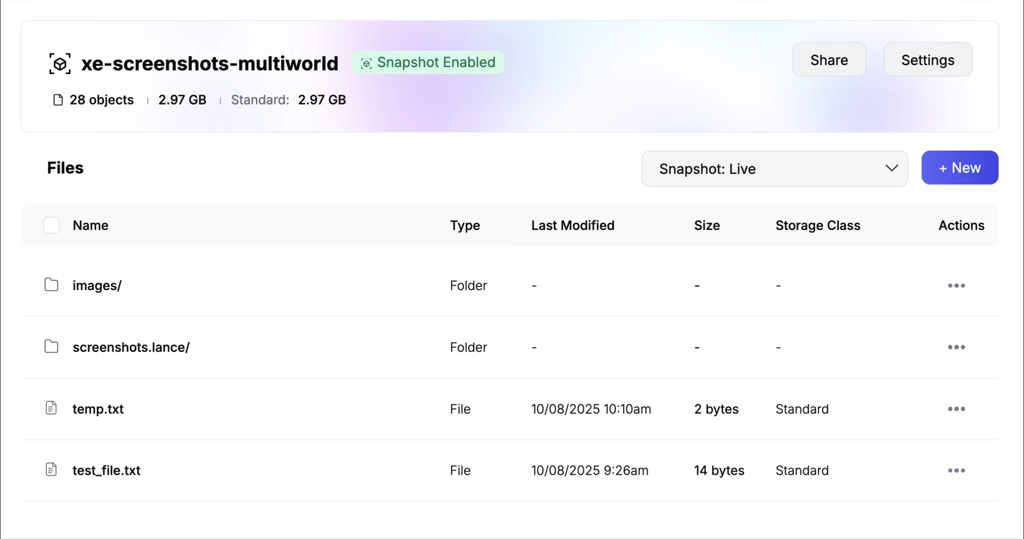
You can also create snapshots programmatically:
- JavaScript
- Python
- Go
Example using the Tigris SDK for JavaScript:
import { createBucketSnapshot } from "@tigrisdata/storage";

const result = await createBucketSnapshot("bucket-with-snapshots", {
  name: "test snapshot", // optional name for the snapshot
});

if (result.error) {
  console.error("error creating bucket snapshot", result.error);
} else {
  console.log("bucket snapshot created");
}
Example using the Python SDK boto3:
pip install tigris-boto3-ext
import boto3
from tigris_boto3_ext import (
    create_snapshot_bucket,
    create_snapshot,
    get_snapshot_version,
)

# Initialize boto3 S3 client
s3_client = boto3.client(
    's3',
    endpoint_url='https://t3.storage.dev',  # Tigris endpoint
    aws_access_key_id='your-access-key',
    aws_secret_access_key='your-secret-key',
)

# Create snapshot-enabled bucket
create_snapshot_bucket(s3_client, 'bucket-with-snapshots')

# Create snapshots
result = create_snapshot(s3_client, 'bucket-with-snapshots', snapshot_name='test-snapshot')
version = get_snapshot_version(result)
Example using the Go SDK github.com/aws/aws-sdk-go-v2/service/s3:
func createBucketSnapshot(ctx context.Context, client *s3.Client, bucketName string, snapshotName string) (string, error) {
	resp, err := client.CreateBucket(ctx, &s3.CreateBucketInput{Bucket: aws.String(bucketName)}, func(options *s3.Options) {
		options.APIOptions = append(options.APIOptions, http.AddHeaderValue("X-Tigris-Snapshot", fmt.Sprintf("true; name=%s", snapshotName)))
	})
	if err != nil {
		return "", err
	}
	rawResp := middleware.GetRawResponse(resp.ResultMetadata).(*http.Response)
	return rawResp.Header.Get("X-Tigris-Snapshot-Version"), nil
}
For detailed instructions:
FAQ
Do snapshots affect performance?
No. Snapshots are metadata-only and don't slow down reads or writes.
Can I enable snapshots on an existing bucket?
No. Snapshot support must be enabled at bucket creation and cannot be added to existing buckets.
Can I disable snapshots after enabling them?
No. Once enabled, snapshot support cannot be disabled.
Can I restore a bucket to a previous snapshot?
We recommend out-of-place recovery: fork from the desired snapshot and use the new bucket. You can also read data from a snapshot to recover individual objects or restore full bucket state.
Can I use object expiration (TTL) with snapshots?
No. Object expiration and storage tier transitions are not supported on snapshot-enabled buckets.