Model Training on Tigris
Training ML models directly from object storage works if the data pipeline can keep up. We benchmarked Tigris against AWS S3 on a standard image classification workload (ViT on 100k JPEGs, g5.8xlarge), then tested what changes when you add TAG (Tigris Acceleration Gateway), a local S3-compatible caching proxy.
Summary
Tigris reaches ~99% GPU utilization with ~134 samples/sec at saturation, which is within 3% of the ~138 samples/sec AWS reported on the same workload. With TAG's warm cache, warm epochs are 5.7x faster and you need 4 workers instead of 16 to saturate the GPU. At peak entitlement, TAG's local cache delivers ~200x the throughput the GPU can consume.
How we ran the benchmarks
| Component | Specification |
|---|---|
| Instance | g5.8xlarge (NVIDIA A10G, 32 vCPUs), us-east-1 |
| Dataset | 100,000 JPEG images (~115 KB each, ~10 GB total) |
| Model | ViT (Vision Transformer) |
| Tool | S3 Connector for PyTorch, same benchmark suite as the AWS reference |
1. Tigris matches AWS S3 on raw images from object storage
Each training image is stored as its own object in S3. The dataloader fetches one object at a time over the network, so that means a lot of waiting. The GPU has to wait too, because it only gets data when the dataloader delivers it.
You can hide that wait time by running more workers. Each worker fetches images in parallel, so more workers means more images per second. The graph below shows how throughput grows as you add workers. With 1 worker you get about 12 samples/sec, with 8 workers you get about 93. At 16 workers, throughput flattens at ~134 samples/sec, and the GPU is now the limit, not the network. Tigris reaches the same saturation point as AWS S3 on this workload.
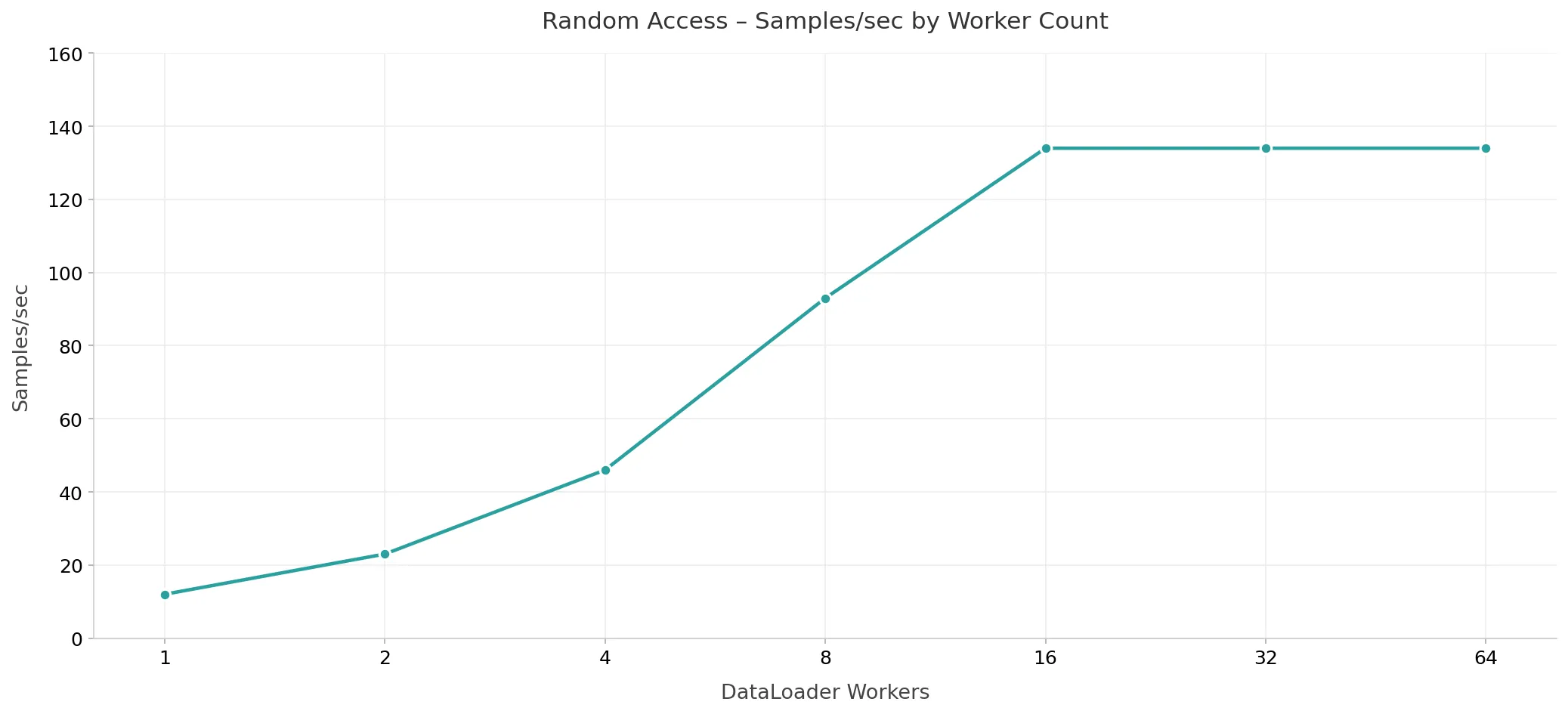
Fig. 1. Throughput (samples/sec) vs. DataLoader worker count, and adding workers increases throughput until the GPU is saturated at 16 workers.
2. Sharding halves the worker count
Packing images into tar shards lets the dataloader issue a single GET request and stream many samples sequentially, shifting from latency-bound to bandwidth-bound. We swept shard sizes from 4 MB to 256 MB with 8 workers.
| Shard Size | Samples/sec | Duration (s) | GPU Util (%) |
|---|---|---|---|
| 4 MB | ~134 | 736.6 | 99.2 |
| 8 MB | ~134 | 736.1 | 99.3 |
| 16 MB | ~134 | 736.3 | 99.3 |
| 32 MB | ~135 | 735.0 | 99.4 |
| 64 MB | ~134 | 736.6 | 99.4 |
| 128 MB | ~134 | 737.1 | 99.3 |
| 256 MB | ~133 | 739.1 | 99.2 |
All sizes deliver ~134 samples/sec at ~99% GPU utilization. The key difference is worker count: sequential sharded access saturates the GPU at 8 workers, compared to 16 for random access. Sharding amortizes per-object TTFB overhead, so fewer workers are needed to keep the GPU fed.
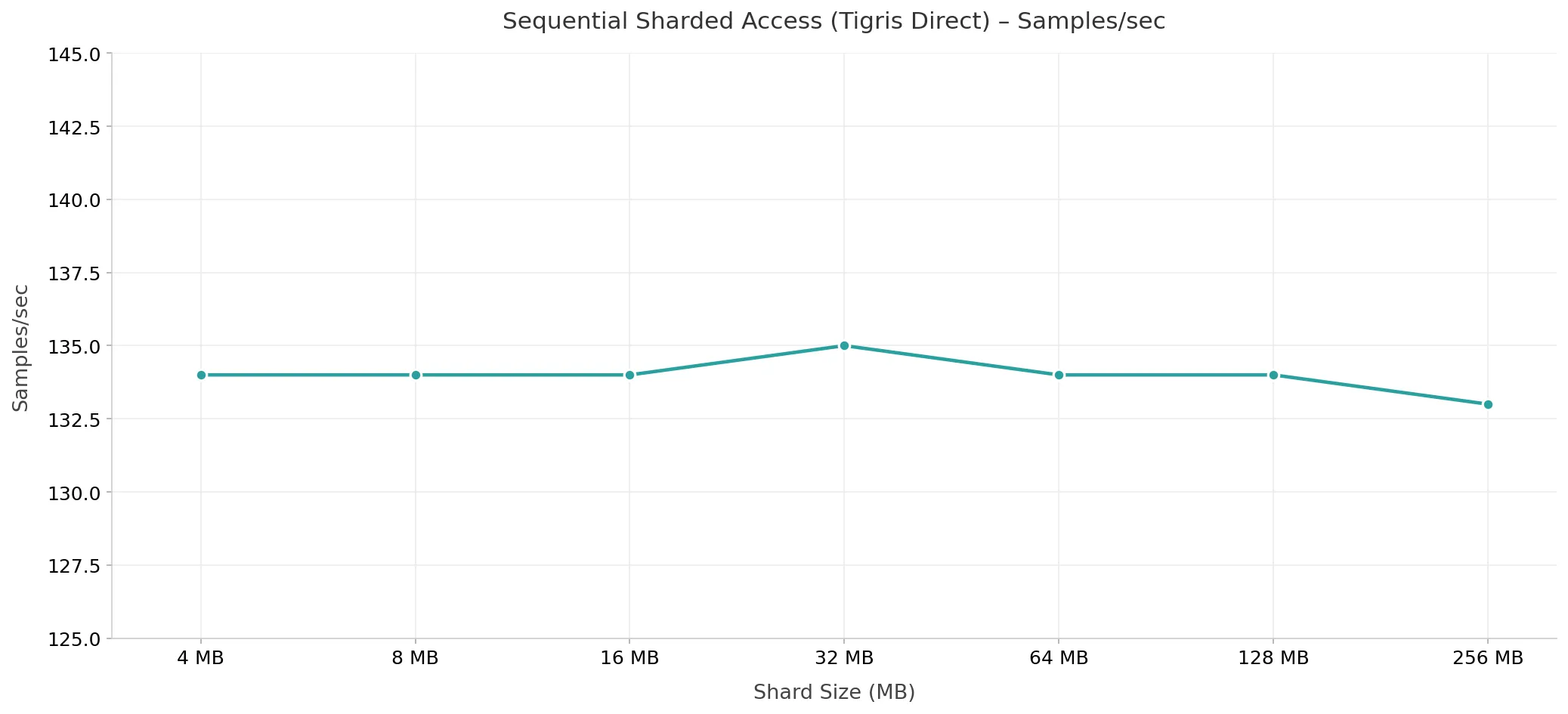
Fig. 2. Samples/sec by shard size with 8 workers (Tigris direct).
3. TAG eliminates network latency after epoch 1
TAG runs on the same machine as your training job. It sits between your app and S3. When the dataloader requests an object, TAG checks its local NVMe cache first. If the object is there, TAG serves it immediately. If not, TAG fetches from S3, stores it in the cache, and returns it to your app.
The first epoch is cold: every object is a cache miss, so TAG fetches from S3 and the network is still the bottleneck. After that, the cache is warm. Epochs 2 and 3 read every object from local NVMe, so there are no network round-trips.
| Metric | Cold (Epoch 1) | Warm (Epoch 2+) |
|---|---|---|
| Epoch duration (2 workers) | 4,197s | 734s |
| Speedup (2 workers) | — | 5.7x faster |
| Workers to saturate the GPU | 16 (no cache) | 4 (warm cache) |
Three things happen when you add TAG:
- Warm epochs are 5.7x faster. At 2 workers, epoch 1 (cold) takes 4,197s, and epochs 2 and 3 take ~734s each.
- Fewer workers needed. With a warm cache, 4 workers saturate the GPU, and without caching, that takes 16.
- No data sharding. With TAG's warm cache, raw unsharded images achieve the same GPU saturation as sharded sequential access.
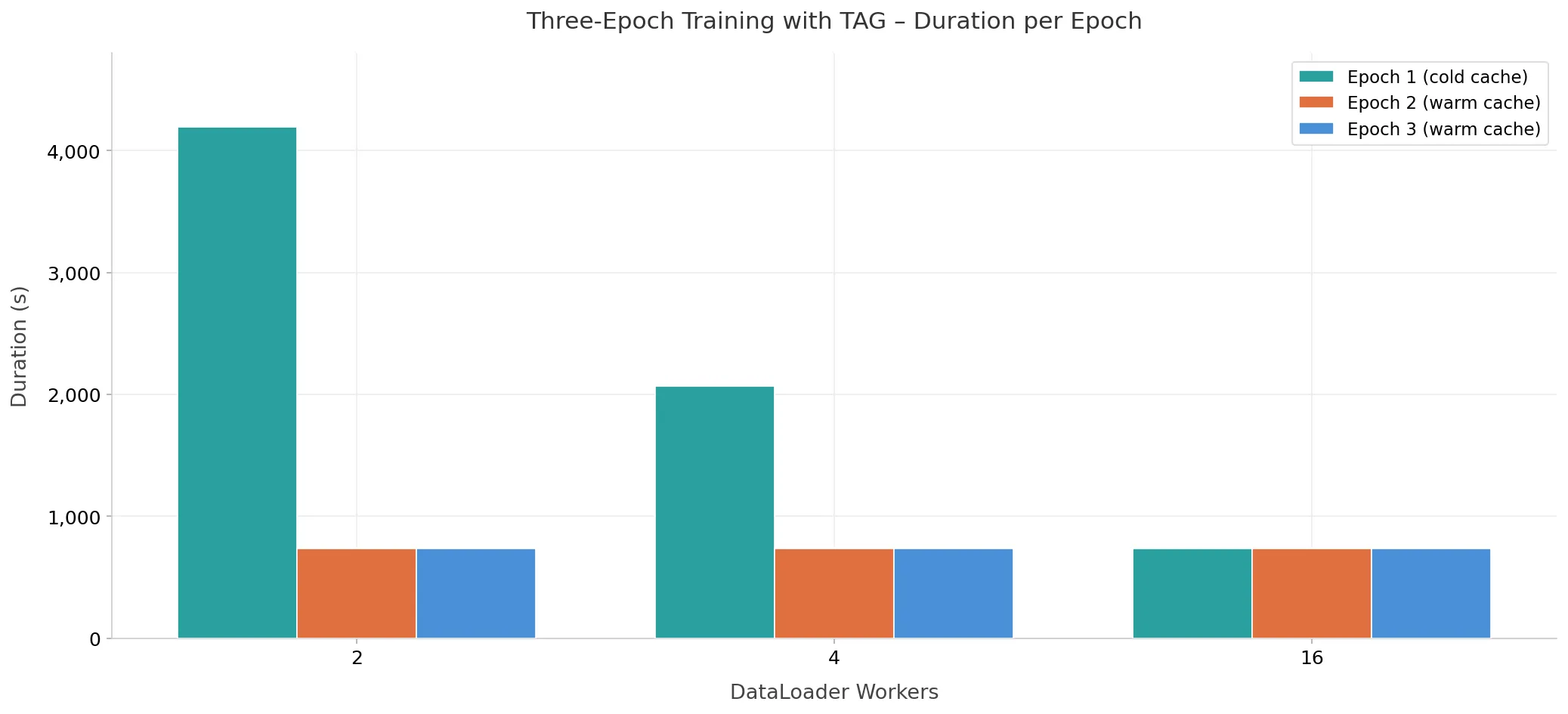
Fig. 3. Epoch duration (seconds) across three training epochs with TAG.
4. 200x headroom: storage is never the bottleneck
During normal training, the GPU is busy computing. That makes it hard to see how fast the data pipeline can run. We swapped ViT for a no-op model that does no computation. The pipeline just feeds samples as fast as it can. That gives us the raw throughput ceiling: how many samples per second storage can deliver when nothing else is slowing it down.
| Config | Workers | Throughput | Headroom over GPU |
|---|---|---|---|
| Tigris direct (64 MB) | 8 | 6,228/sec | 46x |
| TAG warm cache (16 MB) | 8 | 26,820/sec | ~200x |
The GPU is the bottleneck in a well-configured pipeline, not storage.
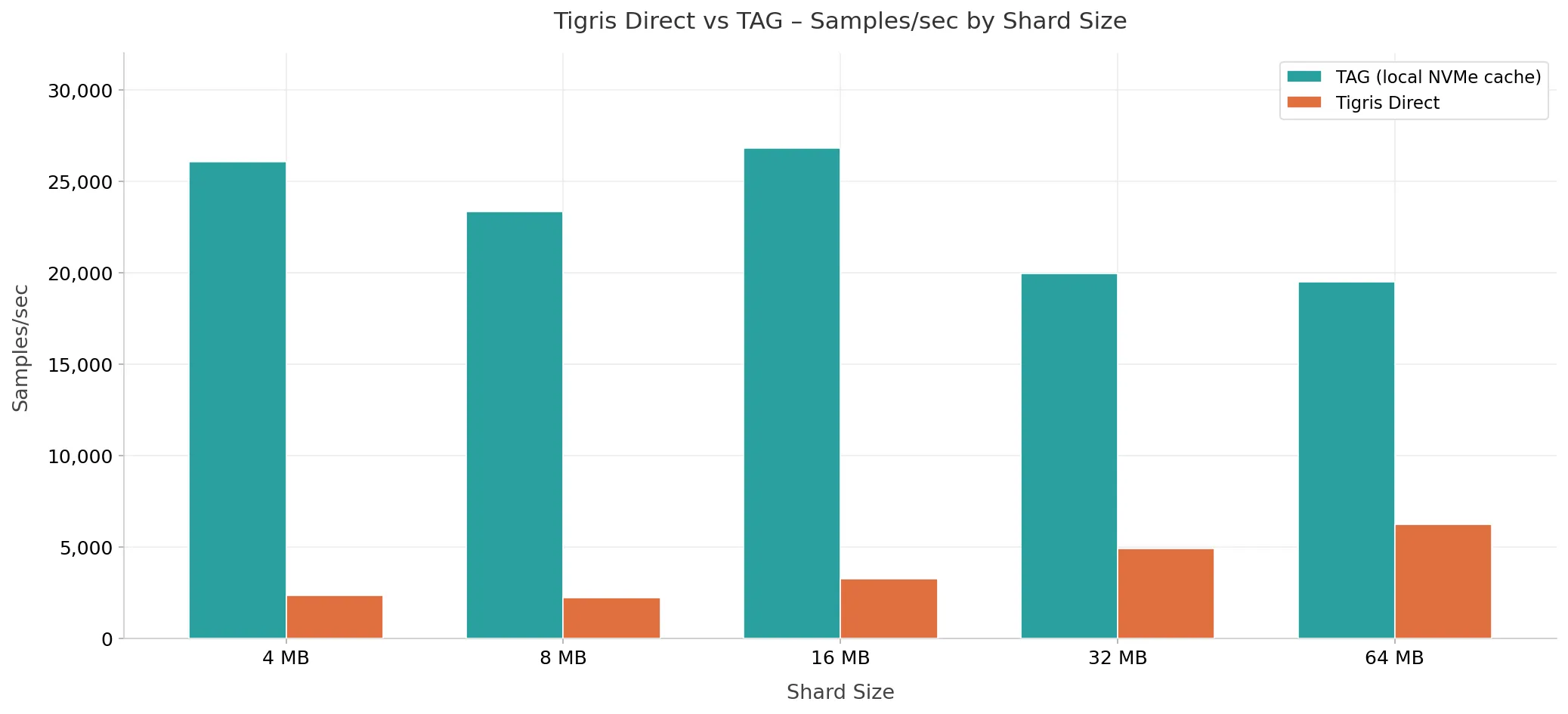
Fig. 4. Raw throughput ceiling: Tigris direct vs. TAG warm cache.
Main findings
| Takeaway | Detail |
|---|---|
| Tigris throughput matches AWS S3. | ~134 samples/sec at saturation, within 3% of AWS S3 on the same ViT workload |
| Warm cache speeds up second and third epochs. | Warm epochs run 5.7x faster than cold epochs with TAG |
| Fewer workers needed to saturate the GPU. | 4 workers saturate the GPU with TAG, compared to 16 without caching |
| Local cache larger than GPU demand. | TAG's local NVMe cache provides ~200x headroom over what the ViT model can consume |
What to read next
- Full benchmark post — Methodology, shard-size sweeps, and per-configuration breakdowns
- Performance Metrics — Benchmark methodology
- Comparison: AWS S3 — Small object workload comparison
- Comparison: Cloudflare R2 — Small object workload comparison
- Benchmark Summary — Complete YCSB results